Setup
Installation
This package is available on PyPI.
$ pip install django-ajax-views
Dependencies
|
|
Note
Required dependencies are installed automatically. Install optional dependencies as needed.
Django settings
Add ajaxviews and dependencies to INSTALLED_APPS:
INSTALLED_APPS = [
    # ...
    'ajaxviews',
    'require',
    'django_js_reverse',
    'crispy_forms',
    # optional
    'guardian',
    'autocomplete_light',
]
To append the JSON config script and the require main script to your HTML body tag, add the middleware class to your settings.
MIDDLEWARE_CLASSES = [
    # ...
    'ajaxviews.middleware.AjaxMiddleware',
]
If you don’t want to use the middleware you need to include those scripts in the base template yourself.
django-ajax-views
REQUIRE_MAIN_NAMEDefault:
'main'Name of the javascript file (without extension) that’s loaded by RequireJS on page load.
DEFAULT_PAGINATE_BYDefault:
30If you use pagination for a
ajaxviews.views.AjaxListViewyou can override the default value for all views.FILTER_SEARCH_INPUT_BYDefault:
10Number of results by which a search input field should be displayed for the
FilterView.AUTO_PAGE_SIZEDefault:
TrueControl the view size using a
page_sizeattribute on a view class.AUTO_FORM_HEADLINEDefault:
TrueIf a
headlineproperty is defined on a forms meta class, it will be displayed with a prefix in generic forms.CREATE_FORM_HEADLINE_PREFIXDefault:
'Add'Text prepended to headline for create views.
UPDATE_FORM_HEADLINE_PREFIXDefault:
'Edit'Text prepended to headline for update views.
FORM_RELATED_OBJECT_IDSDefault:
TrueTo pass on object ids a form depends on to be constructed or saved from a calling view, define url kwargs in your url config with a
'_id'suffix.GENERIC_FORM_BASE_TEMPLATEDefault:
NoneDefine a base template that the built-in generic form extends from.
AUTO_DELETE_URLDefault:
TrueUse a naming convention to automatically parse the delete url string. The view name
edit_<name>is replaced withdelete_<name>.FORM_DELETE_CONFIRMATIONDefault:
TruePopup a confirmation box when clicking on a delete button of a generic form.
AUTO_SUCCESS_URLDefault:
TrueProvides multiple options to define a success url for generic forms.
Order of precedence:
request.POST→form_cfg→form.Meta(if create view) →view class→get_absolute_urlAlso if a hashtag keyword is passed through the post request, it’s value will be appended to the success url.
django-crispy-forms
CRISPY_TEMPLATE_PACKDefault:
'bootstrap'Set this to
'bootstrap3'since this is the currently supported template pack.
django-js-reverse
JS_REVERSE_OUTPUT_PATHDefault:
<STATIC_ROOT>Output path of the
reverse.jsfile which is generated by Django management commandcollectstatic_js_reverse.
django-require
REQUIRE_BASE_URLDefault:
'js'The baseUrl to pass to the r.js optimizer, relative to
STATIC_ROOTREQUIRE_BUILD_PROFILEDefault:
NoneThe name of a build profile to use for your project, relative to
REQUIRE_BASE_URL. Leave blank to use the built-in default build profile if you do not want to build standalone modules.REQUIRE_STANDALONE_MODULESDefault:
{}A dictionary of standalone modules to build with almond.js used in production.
Configure RequireJS
In main.js define the paths to the javascript libraries and require these together with cs!app to
make them available throughout the whole application. I recommend setting up NodeJS and
Bower to manage the Javascript Dependencies.
 (function () {

   require.config({
     paths: {
       'cs':            '/path/to/require-cs/cs',
       'coffee-script': '/path/to/coffeescript/extras/coffee-script',
       'ajaxviews':     '/path/to/require-ajax-views/dist/ajaxviews',
       'domReady':      '/path/to/domReady/domReady',
       'jquery':        '/path/to/jquery/dist/jquery',
       'urlreverse':    '/path/to/django_js_reverse/reverse',
       'bootstrap':     '/path/to/bootstrap/dist/js/bootstrap.min'
       // ...
     }
   });

   require(['domReady!'], function () {
     require([
       'jquery',
       'urlreverse',
       'bootstrap',
       // ...
       'cs!app'
     ]);
   });

 })();
Using the prefix cs! tells RequireJS to load a coffeescript file. The following initializes the
App and configures it to load all views and the middleware as coffeescript modules.
To execute a user defined Middleware for all requests, specify the file name in the config.
 define ['ajaxviews'], (ajaxviews) ->
   App = ajaxviews.App

   App.config
     module:
       prefix: 'cs!'
       middleware: 'middleware'
     debug: true

   App.init()
Note
Do not add file extensions to any path definitions or require calls. RequireJS expects all files
to be javascript files. With plugins like require-cs and using the prefix you can load different
file extensions as well.
Build profile
For better performance in production use Almond as replacement AMD loader for RequireJS. The following build
profile bundles all your modules and dependencies into a single file using the r.js optimizer. It’s shipped
with django-require which also includes the require.js and almond.js libraries. Since Almond doesn’t
support dynamic loading it’s much more lightweight and faster than RequireJS.
({
    baseUrl: 'path/to/js/root/',
    name: 'almond',
    include: [
        'cs!middleware',
        'cs!mixins/mixin_name',
        'cs!views/view_name',
        // ...
    ],
    exclude: ['coffee-script'],
    insertRequire: ['main'],
    stubModules: ['cs'],
    mainConfigFile: 'path/to/main.js',
    findNestedDependencies: true,
    optimize: 'none',
    wrap: true
});
Caution
Be sure to include the middleware, views and mixins modules that you have created in the build profile. Since those modules are loaded dynamically they can’t be traced automatically on build if they are not required elsewhere in a modules top define call.
For development you can use the built-in default profile or create your own if desired.
Stylus (CSS)
If you want to use support for page, modal and form sizes and additional view styles, you need to import the stylus file located in require-ajax-views source directory.
Add a page_size attribute to your view class or pass it on as a keyword argument to your template context to set
the size for the view (all sizes, offsets and view styles can be overridden).
|
|
Check out the source file for the following view styles:
.modal-header.filter-header.form-add-link#ajax-progress-bar#static-sidebar
Template Layouts
These are examples of how you could design your layouts to make your templates ajaxable and set the view size.
To render the class strings load the viewsize template tag which provides a container_size and
sidebar_offset tag.
{% extends 'base.html' %}
{% load viewsize %}

{% block page %}

<div class="{% container_size %}">
  {% block header %}{% endblock %}
  <div id="ajax-content">
    {% block main_content %}{% endblock %}
  </div>
</div>

{% endblock %}
- container_size:
- page_size:
lg→.container-lg
{% extends 'base.html' %}
{% load viewsize %}

{% block page %}

<div class="{% container_size %}">
  <div id="static-sidebar">
    {% block sidebar_content %}{% endblock %}
  </div>
  <div id="main-content" class="{% sidebar_offset %}">
    {% block header %}{% endblock %}
    <div id="ajax-content">
      {% block main_content %}{% endblock %}
    </div>
  </div>
</div>

{% endblock %}
- container_size:
- page_size:
md& sidebar_offset:sm→.container-md-sidebar-offset-sm
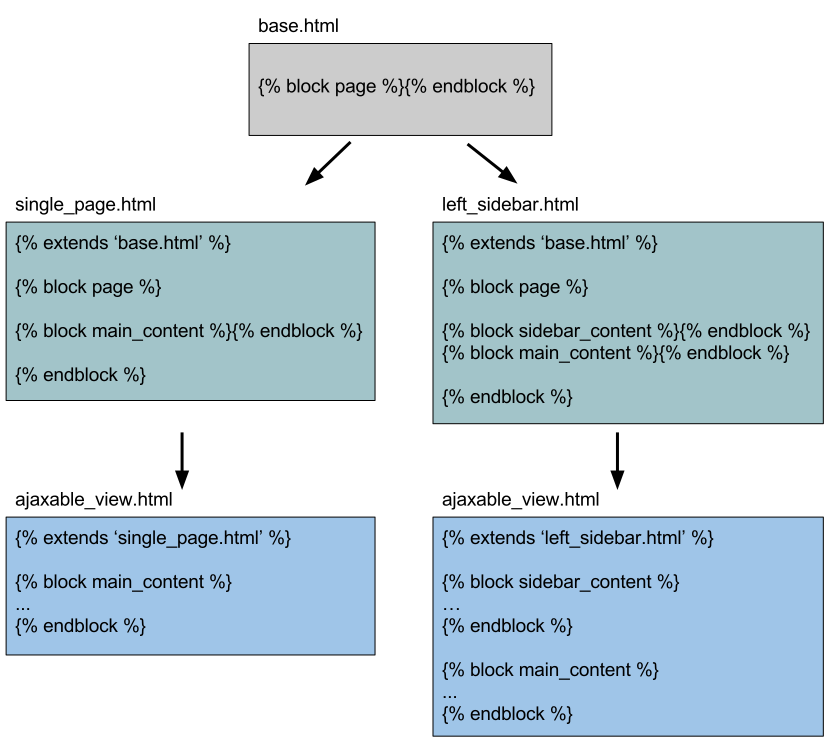
Ideally you’d have a base template from which your layout templates extend from. The templates containing the content of the view derive from your layout templates.
Following templates are available to enhance view control:
__ajax_base.html__modal_base.html_drag_drop.html_form_controls.html_middleware.html_paginate.html_select_date_filter.html_select_multiple_filter.html_table_sort.htmlgeneric_form.html
Extend from templates with a leading double underscore and include those with a single underscore. The generic form should be used directly.